Keep the regulars
on a set schedule.
Some customers want the same detail on a set rhythm. Open the job, set the next date and time, and create the schedule from the booking you already have.
Customer scheduling is on Pro · $99/month, and on Agency. It is not on Basic or Plus.
- Next date and time
- Repeat and weekday
- Price and package
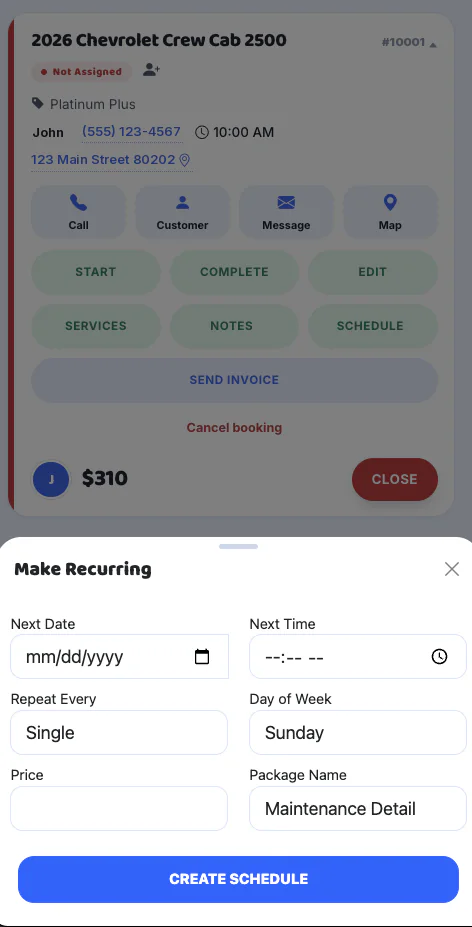
From the job
to the next visit.
Open Make Recurring on the booking. This is how you keep a customer on a set schedule. It used to be called memberships. On the drive, send an On My Way text. At the car, run detailer intake.
Open the job
On the booking, open Make Recurring. The schedule starts from the customer and the job you already have.
Set the next visit
Choose the next date and the next time. That is the visit you are putting on the schedule.
Set repeat and price
Pick how often it repeats and the day of the week. Enter the price and the package name, such as a maintenance detail.
Create the schedule
Tap Create Schedule. That customer stays on the schedule you just set.
One schedule.
The same customer.
Customer scheduling is the repeating visit. The customer list and the day calendar live on Customers & Schedule. This page is the set schedule you create from the job.
- Next date and next time
- How often it repeats, and the day of the week
- Price and package name
- Created from the booking you already have
Pro · $99/month
Customer scheduling is on Pro and Agency. It is not included on Basic or Plus. Start free, then move up when you want repeating schedules.
Start My Business Free →Agency includes what is on Pro. See all plans.
Clear answers.
Before you start.
What is customer scheduling?
Customer scheduling keeps a regular customer on a set schedule. From the job, you set the next date, next time, how often it repeats, the day of the week, the price, and the package, then create the schedule.
Is this the same as memberships?
It used to be called memberships. The feature is customer scheduling: a repeating visit with a date, time, price, and package. It is not a separate membership product.
Which plan includes customer scheduling?
Customer scheduling is on Pro at $99 per month and on Agency. It is not included on Basic or Plus.
What does Make Recurring ask for?
Next date, next time, repeat, day of the week, price, and package name. You fill those in on the job and tap Create Schedule.
Can I start free and add this later?
Yes. Start on Basic at $0 per month. Move to Pro or Agency when you want customer scheduling. Compare plans before you upgrade.
Put the regulars
on the calendar.
Start with a free account. Move to Pro when you want customer scheduling.